Master the essential skills and tools required to identify, assess, and remediate security vulnerabilities in modern IT environments. This course is designed to give you hands-on experience with industry-standard tools like Nessus, OpenVAS, and ManageEngine VMP, while building a strong understanding of vulnerability scanning, risk prioritization, and remediation workflows.
6H 3M
Time
Beginner
Experience Level
6
CREDITS
Tech Skill School
Instructor
Choose Your Plan
Learners will gain hands-on experience with industry-grade tools
The Vulnerability Management for Security Analysts course is a comprehensive, hands-on training program designed to equip learners with the knowledge, tools, and techniques required to effectively identify, assess, prioritize, and remediate vulnerabilities across IT environments. This course begins with an in-depth exploration of the core concepts of vulnerability management covering its importance, lifecycle, industry best practices, and compliance considerations. Participants will then gain practical expertise with leading vulnerability management tools, including Nessus, OpenVAS, and ManageEngine Vulnerability Manager Plus, through step-by-step guidance on installation, configuration, scanning, analysis, reporting, and integration with broader security workflows. With real-world examples, guided demonstrations, and actionable strategies, this course empowers security analysts to strengthen organizational defenses, reduce risk exposure, and enhance incident prevention capabilities. By the end, learners will be able to confidently perform vulnerability assessments, interpret scan results, and drive remediation processes that align with security objectives and compliance requirements.
Key Learning Outcomes:
● Understand the fundamentals of vulnerability management, its lifecycle, and its role in cybersecurity defense.
● Learn to deploy and configure industry-standard vulnerability management tools (Nessus, OpenVAS, ManageEngine Vulnerability Manager Plus).
● Perform targeted vulnerability scans on systems, networks, and applications with optimized configurations.
● Interpret and analyze scan results to identify critical vulnerabilities and their potential impact.
● Generate comprehensive vulnerability reports in multiple formats tailored for technical teams and executives.
● Track remediation progress and integrate findings with other security tools and workflows.
● Gain hands-on experience with tool-specific features, licensing, and deployment options for scalable operations.
● Build a repeatable, measurable, and effective vulnerability management program in alignment with best practices and compliance standards.
Course Curriculum
1
Introduction & Essentials
Start your journey with the course overview and foundational concepts of vulnerability management.
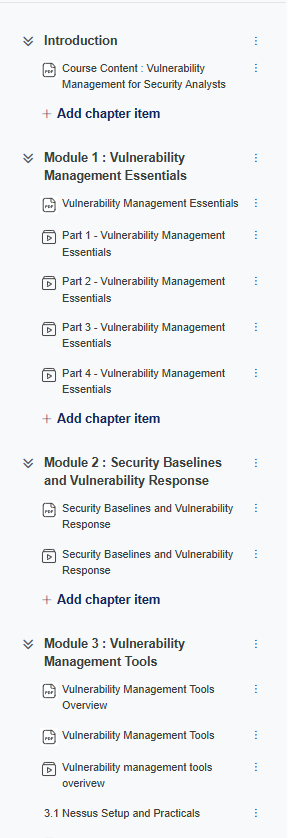
Course Content : Vulnerability Management for Security Analysts
Vulnerability Management Essentials
Part 1 - Vulnerability Management Essentials
Part 2 - Vulnerability Management Essentials
Part 3 - Vulnerability Management Essentials
Part 4 - Vulnerability Management Essentials
2
Security Baselines & Response
Deep dive into establishing security baselines and executing effective vulnerability responses.
Security Baselines and Vulnerability Response
Security Baselines and Vulnerability Response
3
Vulnerability Management Tools
Master industry-leading tools including Nessus, OpenVAS, and ManageEngine VMP.
Download the Nessus installer from the official Tenable website for your specific operating system.
3.1.2
Nessus Lab Setup
Install and configure Nessus in your lab environment, including initial activation and plugin updates.
3.1.3
Nessus Dashboard Overview
Navigate the Nessus interface, understand the scan management console, and explore key dashboard components.
3.1.4
Nessus Host Discovery Scan
Identify active devices and open ports on your network using the host discovery scan template.
3.1.5
Nessus Basic Network Scan
Perform a standard vulnerability assessment to detect security flaws in network services and operating systems.
3.1.6
Nessus Basic Network Scan Analysis
Review and interpret scan results, prioritizing vulnerabilities based on severity and risk.
3.1.7
Nessus Advanced Scan
Configure and execute advanced scans using custom policies for deeper analysis and specific audit requirements.
3.1.8
Nessus Plugin And Reports
Manage Nessus plugins and generate detailed reports in various formats for stakeholders.
3.1.9
Policy in Nessus
Create and manage custom scan templates and policies tailored to organizational security standards.
3.1.10
Nessus Settings
Manage user accounts, system updates, and global configuration settings within the Nessus console.
Nessus Lab Environment Overview
Visual representation of the Nessus scanning environment and dashboard configuration used in the practical sessions.
Nessus Product Versions
Nessus Professional
The industry standard for vulnerability assessment.
Nessus Expert
Vulnerability assessment for the modern attack surface.
Nessus Essentials
Free version of Nessus for educators, students and hobbyists.
Nessus Practical Lab Scenarios
01
Host Discovery Scan
02
Basic Network Scan
03
Advanced Scan
04
Credentialed Scan
05
Web Application Scan
06
Compliance Scan
07
Malware Scan
08
Mobile Device Scan
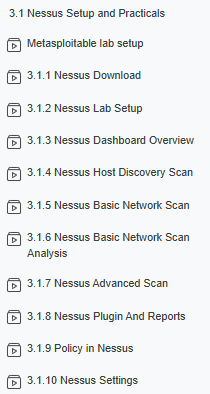
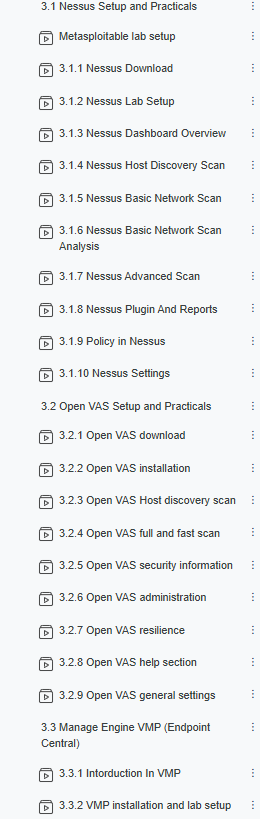
Metasploitable lab setup
3.1.1 Nessus Download
3.1.2 Nessus Lab Setup
3.1.3 Nessus Dashboard Overview
3.1.4 Nessus Host Discovery Scan
3.1.5 Nessus Basic Network Scan
3.1.6 Nessus Basic Network Scan Analysis
3.1.7 Nessus Advanced Scan
3.1.8 Nessus Plugin And Reports
3.1.9 Policy in Nessus
3.1.10 Nessus Settings
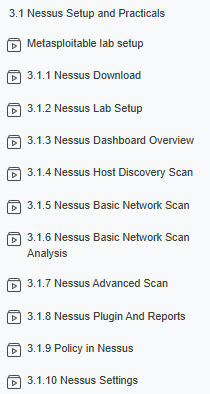
Metasploitable lab setup
3.1.1 Nessus Download
3.1.2 Nessus Lab Setup
3.1.3 Nessus Dashboard Overview
3.1.4 Nessus Host Discovery Scan
3.1.5 Nessus Basic Network Scan
3.1.6 Nessus Basic Network Scan Analysis
3.1.7 Nessus Advanced Scan
3.1.8 Nessus Plugin And Reports
3.1.9 Policy in Nessus
3.1.10 Nessus Settings
MODULE 3.2
3.2 Open VAS Setup and Practicals
3.2.1 Open VAS download
3.2.2 Open VAS installation
3.2.3 Open VAS Host discovery scan
3.2.4 Open VAS full and fast scan
3.2.5 Open VAS security information
3.2.6 Open VAS administration
3.2.7 Open VAS resilience
3.2.8 Open VAS help section
3.2.9 Open VAS general settings
3.2.1 Open VAS download
3.2.2 Open VAS installation
3.2.3 Open VAS Host discovery scan
3.2.4 Open VAS full and fast scan
3.2.5 Open VAS security information
3.2.6 Open VAS administration
3.2.7 Open VAS resilience
3.2.8 Open VAS help section
3.2.9 Open VAS general settings
MODULE 3.3
3.3 Manage Engine VMP (Endpoint Central)
Vulnerability Management Tools Overview
Nessus
Industry-standard scanner for deep vulnerability assessment and compliance reporting.
Open VAS
Powerful open-source framework for vulnerability scanning and management.
ManageEngine VMP
Integrated solution for vulnerability assessment and automated patch management.
3.3.1 Introduction In VMP
3.3.2 VMP installation and lab setup
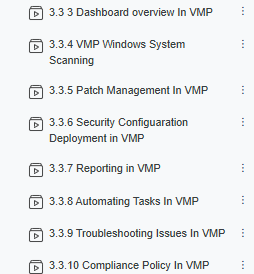
3.3.3 Dashboard overview In VMP
3.3.4 VMP Windows System Scanning
3.3.5 Patch Management In VMP
3.3.6 Security Configuration Deployment in VMP
3.3.7 Reporting in VMP
3.3.8 Automating Tasks In VMP
3.3.9 Troubleshooting Issues In VMP
3.3.10 Compliance Policy In VMP
3.3.1 Intorduction In VMP
3.3.2 VMP installation and lab setup
3.3.3 Dashboard overview In VMP
3.3.4 VMP Windows System Scanning
3.3.5 Patch Management In VMP
3.3.6 Security Configuaration Deployment in VMP
3.3.7 Reporting in VMP
3.3.8 Automating Tasks In VMP
3.3.9 Troubleshooting Issues In VMP
3.3.10 Compliance Policy In VMP
4
Share Your Achievement
When you complete the 'Vulnerability Management for Security Analyst' course, share your success with your network. Highlighting your new skills shows peers and potential employers your commitment to cybersecurity excellence.
Why Choose This Course
Measure Your Progress
Track your skills development from lesson to lesson using the TSS Skills Tracker.
Vulnerability Management & Remediation
Learn how to manage vulnerabilities effectively using ManageEngine VMP and structured workflows used by security teams.
Job-Ready Analyst Skills
Develop the mindset and workflow of a real vulnerability management analyst working in SOC environments.